

Now Reading: 풀스택 개발자를 위한 맥북 올인원 설정 가이드 – Part 3
1
-
01
풀스택 개발자를 위한 맥북 올인원 설정 가이드 – Part 3


풀스택 개발자를 위한 맥북 올인원 설정 가이드 – Part 3
컨테이너와 오케스트레이션 환경 구축
Part 3에서는 현대 풀스택 개발의 핵심인 Docker와 Kubernetes 환경 설정을 다룹니다. 특히 M3/M4 맥북의 성능 특성을 고려하여 Docker Desktop 대신 Minikube를 활용한 경량화된 개발 환경을 구축합니다.
9단계: Docker 환경 설정
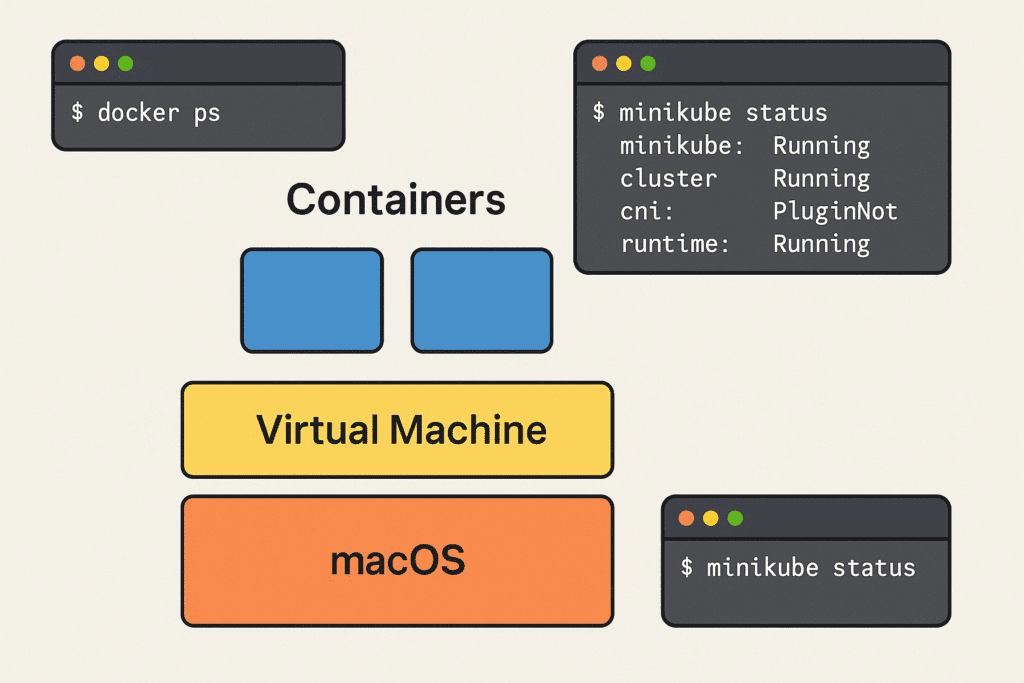
Docker Desktop 대안: Minikube + Docker
Docker Desktop은 M3/M4 맥북에서 메모리와 CPU를 많이 사용하는 단점이 있습니다. Minikube를 활용하면 더 효율적인 환경을 구축할 수 있습니다.
# Minikube 설치
brew install minikube
# VirtualBox 대신 HyperKit 드라이버 사용 (더 빠름)
brew install hyperkit
# Docker 설치 (CLI만)
brew install docker
brew install docker-compose
# Minikube 시작 (Docker만 사용, Kubernetes 제외)
brew install docker-compose
minikube start –driver=hyperkit –memory=4096 –cpus=4 –no-kubernetes
# Minikube의 Docker 데몬 사용
eval $(minikube docker-env)
# Docker 정상 작동 확인
docker –version
docker run hello-world
docker run hello-world
Minikube 환경 최적화
# Minikube 자동 마운트 설정
minikube start –mount –mount-string=”/Users:/Users”
# 개발용 별칭 설정
alias denv=’eval $(minikube docker-env)’
alias denv-unset=’eval $(minikube docker-env -u)’
# Minikube 상태 확인 함수
alias denv-unset=’eval $(minikube docker-env -u)’
function minikube-status() {
echo “Minikube Status:”
minikube status
echo “\nDocker Version:”
docker –version
echo “\nDocker Images:”
docker images –format “table {{.Repository}}\t{{.Tag}}\t{{.Size}}”
}
minikube status
echo “\nDocker Version:”
docker –version
echo “\nDocker Images:”
docker images –format “table {{.Repository}}\t{{.Tag}}\t{{.Size}}”
}
Docker Compose 프로젝트 설정
version: '3.8'
services:
  frontend:
    build: ./frontend
    ports:
      - "3000:3000"
    volumes:
      - ./frontend:/app
      - /app/node_modules
    environment:
      - CHOKIDAR_USEPOLLING=true
    command: npm start
  backend:
    build: ./backend
    ports:
      - "8000:8000"
    volumes:
      - ./backend:/app
    environment:
      - DATABASE_URL=postgresql://user:password@db:5432/dbname
    depends_on:
      - db
  db:
    image: postgres:15-alpine
    environment:
      - POSTGRES_DB=dbname
      - POSTGRES_USER=user
      - POSTGRES_PASSWORD=password
    volumes:
      - postgres_data:/var/lib/postgresql/data
volumes:
  postgres_data:
10단계: Kubernetes 로컬 개발 환경
Minikube Kubernetes 클러스터 설정
# Kubernetes가 포함된 Minikube 클러스터 시작
minikube start –driver=hyperkit –memory=6144 –cpus=4 –kubernetes-version=v1.28.0
# kubectl 설치
brew install kubectl
# kubectx, kubens 설치 (컨텍스트 관리)
brew install kubectx
# kubectl 자동완성 설정
echo ‘source <(kubectl completion zsh)' >> ~/.zshrc
source ~/.zshrc
# 유용한 kubectl 별칭
source ~/.zshrc
alias k=’kubectl’
alias kgp=’kubectl get pods’
alias kgs=’kubectl get svc’
alias kgd=’kubectl get deployment’
alias kaf=’kubectl apply -f’
alias kdf=’kubectl delete -f’
Kubernetes 개발 도구 설치
# Helm 설치 (Kubernetes 패키지 매니저)
brew install helm
# K9s 설치 (Kubernetes CLI UI)
brew install k9s
# Lens 설치 (Kubernetes 데스크톱 IDE)
brew install –cask lens
# Skaffold 설치 (Kubernetes 개발 워크플로우)
brew install skaffold
Kubernetes 매니페스트 예시
# deployment.yaml
apiVersion: apps/v1
kind: Deployment
metadata:
  name: fullstack-app
spec:
  replicas: 2
  selector:
    matchLabels:
      app: fullstack-app
  template:
    metadata:
      labels:
        app: fullstack-app
    spec:
      containers:
      - name: frontend
        image: my-frontend:latest
        ports:
        - containerPort: 3000
      - name: backend
        image: my-backend:latest
        ports:
        - containerPort: 8000
        env:
        - name: DATABASE_URL
          valueFrom:
            secretKeyRef:
              name: db-secret
              key: url

---
apiVersion: v1
kind: Service
metadata:
  name: fullstack-service
spec:
  selector:
    app: fullstack-app
  ports:
    - name: frontend
      port: 80
      targetPort: 3000
    - name: backend
      port: 8080
      targetPort: 8000
  type: LoadBalancer

---
apiVersion: networking.k8s.io/v1
kind: Ingress
metadata:
  name: fullstack-ingress
  annotations:
    nginx.ingress.kubernetes.io/rewrite-target: /
spec:
  rules:
  - host: fullstack.local
    http:
      paths:
      - path: /
        pathType: Prefix
        backend:
          service:
            name: fullstack-service
            port:
              number: 80
      - path: /api
        pathType: Prefix
        backend:
          service:
            name: fullstack-service
            port:
              number: 8080
Skaffold 개발 워크플로우
# skaffold.yaml
apiVersion: skaffold/v2beta29
kind: Config
metadata:
  name: fullstack-app
build:
  artifacts:
  - image: my-frontend
    context: ./frontend
    docker:
      dockerfile: Dockerfile
  - image: my-backend
    context: ./backend
    docker:
      dockerfile: Dockerfile
deploy:
  kubectl:
    manifests:
    - k8s/*.yaml
portForward:
- resourceType: service
  resourceName: fullstack-service
  port: 80
  localPort: 3000
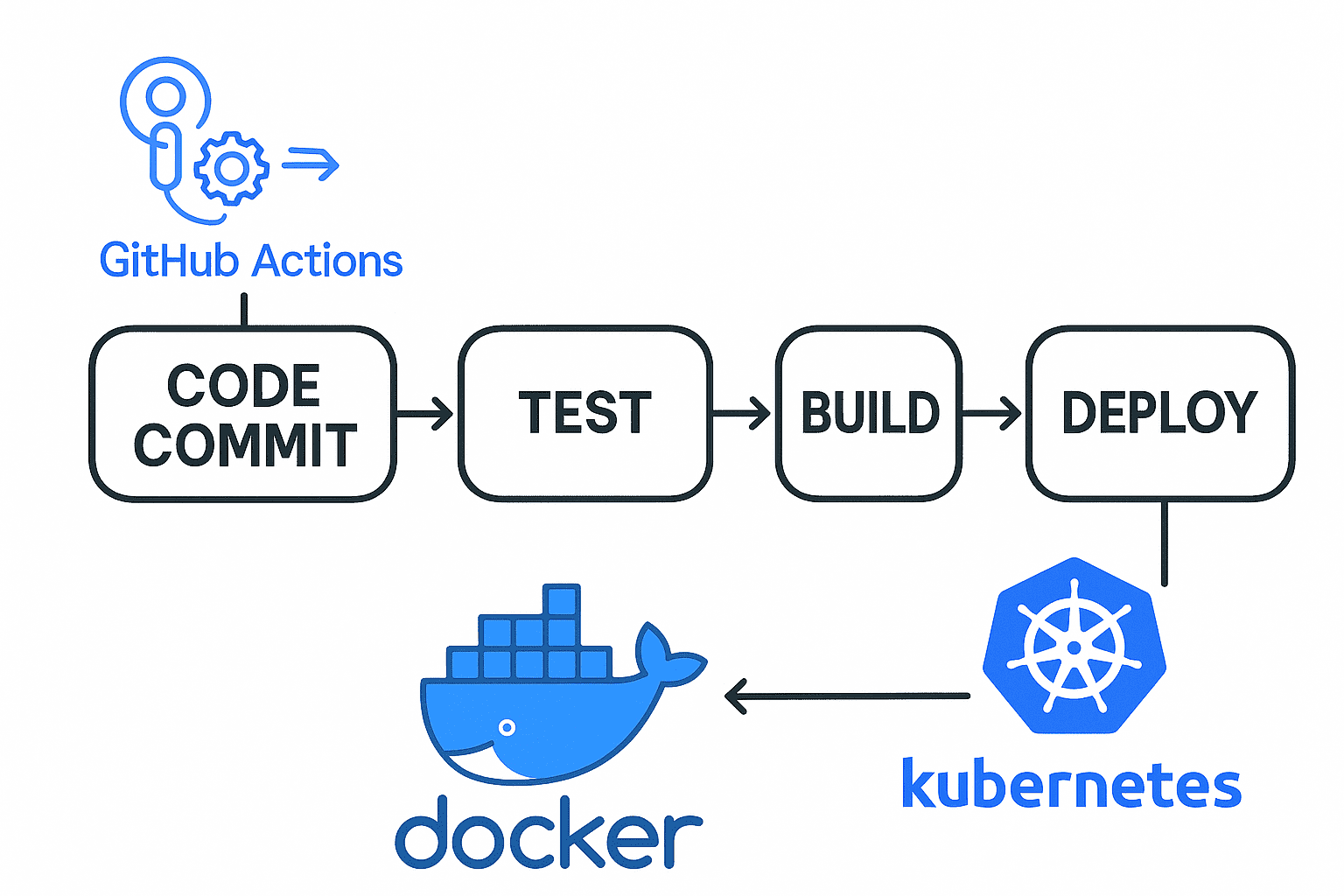
11단계: CI/CD 워크플로우 설정
GitHub Actions 워크플로우
# .github/workflows/ci.yml
name: CI/CD Pipeline

on:
  push:
    branches: [ main, develop ]
  pull_request:
    branches: [ main ]

jobs:
  test:
    runs-on: ubuntu-latest
    strategy:
      matrix:
        node-version: [18.x, 20.x]
        python-version: [3.11, 3.12]

    steps:
    - uses: actions/checkout@v4

    - name: Setup Node.js
      uses: actions/setup-node@v4
      with:
        node-version: ${{ matrix.node-version }}
        cache: 'npm'

    - name: Setup Python
      uses: actions/setup-python@v4
      with:
        python-version: ${{ matrix.python-version }}

    - name: Install dependencies
      run: |
        cd frontend && npm ci
        cd ../backend && pip install -r requirements.txt

    - name: Run tests
      run: |
        cd frontend && npm test
        cd ../backend && pytest

  build-and-deploy:
    needs: test
    runs-on: ubuntu-latest
    if: github.ref == 'refs/heads/main'

    steps:
    - uses: actions/checkout@v4

    - name: Login to Docker Hub
      uses: docker/login-action@v3
      with:
        username: ${{ secrets.DOCKERHUB_USERNAME }}
        password: ${{ secrets.DOCKERHUB_TOKEN }}

    - name: Build and push Docker images
      run: |
        docker build -t ${{ secrets.DOCKERHUB_USERNAME }}/frontend:latest ./frontend
        docker build -t ${{ secrets.DOCKERHUB_USERNAME }}/backend:latest ./backend
        docker push ${{ secrets.DOCKERHUB_USERNAME }}/frontend:latest
        docker push ${{ secrets.DOCKERHUB_USERNAME }}/backend:latest
로컬 CI/CD 테스트
# Act를 사용하여 로컬에서 GitHub Actions 테스트
brew install act
# 워크플로우 실행
act -j test
# 특정 이벤트 시뮬레이션
act push -j build-and-deploy
12단계: 개발 환경 모니터링
개발용 모니터링 스택
# monitoring/docker-compose.yml
version: '3.8'

services:
  prometheus:
    image: prom/prometheus:latest
    ports:
      - "9090:9090"
    volumes:
      - ./prometheus.yml:/etc/prometheus/prometheus.yml
      - prometheus_data:/prometheus
    command:
      - '--config.file=/etc/prometheus/prometheus.yml'
      - '--storage.tsdb.path=/prometheus'

  grafana:
    image: grafana/grafana:latest
    ports:
      - "3000:3000"
    volumes:
      - grafana_data:/var/lib/grafana
    environment:
      - GF_SECURITY_ADMIN_PASSWORD=admin

  node-exporter:
    image: prom/node-exporter:latest
    ports:
      - "9100:9100"
    volumes:
      - /proc:/host/proc:ro
      - /sys:/host/sys:ro
      - /:/rootfs:ro
    command:
      - '--path.procfs=/host/proc'
      - '--path.sysfs=/host/sys'
      - '--collector.filesystem.mounted-points'

volumes:
  prometheus_data:
  grafana_data:
Docker 메트릭 수집
# prometheus.yml
global:
  scrape_interval: 15s

scrape_configs:
  - job_name: 'docker'
    static_configs:
      - targets: ['host.docker.internal:9323']

  - job_name: 'node-exporter'
    static_configs:
      - targets: ['node-exporter:9100']

  - job_name: 'minikube'
    static_configs:
      - targets: ['minikube:8443']
    scheme: https
    tls_config:
      insecure_skip_verify: true
성능 최적화 팁
컨테이너 빌드 최적화
# Dockerfile (멀티스테이지 빌드)# Frontend FROM node:18-alpine as frontend-builder WORKDIR /app COPY package*.json ./ RUN npm ci COPY . . RUN npm run build FROM nginx:alpine COPY --from=frontend-builder /app/dist /usr/share/nginx/html COPY nginx.conf /etc/nginx/nginx.conf # Backend FROM python:3.12-slim as backend-builder WORKDIR /app COPY requirements.txt . RUN pip install --no-cache-dir -r requirements.txt COPY . . FROM python:3.12-slim WORKDIR /app COPY --from=backend-builder /usr/local/lib/python3.12/site-packages /usr/local/lib/python3.12/site-packages COPY --from=backend-builder /app . CMD ["uvicorn", "main:app", "--host", "0.0.0.0", "--port", "8000"]
Minikube 성능 튜닝
# Minikube 성능 최적화 설정
minikube config set memory 8192
minikube config set cpus 6
minikube config set disk-size 50GB
# 네트워크 성능 최적화
minikube config set cpus 6
minikube config set disk-size 50GB
minikube addons enable ingress
minikube addons enable metrics-server
# 이미지 풀 정책 최적화
minikube addons enable metrics-server
kubectl create ns development
kubectl patch deployment my-app -n development -p ‘{“spec”:{“template”:{“spec”:{“containers”:[{“name”:”my-app”,”imagePullPolicy”:”IfNotPresent”}]}}}}’
kubectl patch deployment my-app -n development -p ‘{“spec”:{“template”:{“spec”:{“containers”:[{“name”:”my-app”,”imagePullPolicy”:”IfNotPresent”}]}}}}’
트렌디 노트 요약
컨테이너와 오케스트레이션 환경 구축의 핵심 포인트:
- Docker Desktop 대체: Minikube를 활용한 경량 컨테이너 환경
- 통합 워크플로우: Skaffold로 개발부터 배포까지 자동화
- 모니터링: Prometheus + Grafana로 개발 환경 가시성 확보
- 성능 최적화: 멀티스테이지 빌드와 이미지 캐싱 전략
이제 Part 4에서는 보안 설정과 전체 환경의 최적화를 다룰 예정입니다.
작업 상황 업데이트
- [x] 블로그 파일 생성
- [x] 주제 연구 및 데이터 수집 완료
- [x] Part 1 작성 완료 (Homebrew, 터미널, Git 설정)
- [x] Part 2 작성 완료 (Node.js, Python, Go 설정)
- [x] Part 3 작성 완료 (Docker/Kubernetes 설정)
- [ ] Part 4 작성 (보안 및 최적화)
- [ ] 파일 병합 및 최종 검토
Related Posts


Previous Post
Next Post
Donations









Categories


Advertisement

Loading Next Post...